SQXL 2026: The Promised Day × Makai World Cup 2026 Unofficial Event Guide for iOS/iPadOS/MacOS

What is this?

It’s been awhile! If you already know the deal by now, you can skip to the end of the post for the download. For everyone new, read on to see what this handy little tool does.

This iOS/MacOS shortcut provides information regarding SQXL 2026: The Promised Day. Opening it will show a menu where you can get quick access to important (& Makai World Cup 2026!) resources such pulling up the brackets, navigate you to the venue, displaying hotel & shuttle information, providing quick links to streams and more. Take a look at this video to see the one I made for CEO2025 in action.

Installation

  1. Make sure you have the Shortcuts app installed on your device. This is an official Apple application used to help automate your device.
  2. On your device, head to routinehub to download the shortcut (Tested on iPhone & Mac).
  3. Once it prompts you to install the shortcut, Click install.

How to Use It

Should be pretty self-explanatory. It’s basically a menu of options, just go through it & choose what info you’d like to see! For many of the actions, the shortcut will run again & pop up the main menu after you go through the steps. To dismiss it, just tap somewhere outside the menu & it will close.

The shortcut can also be run by tapping it’s icon inside the Shortcuts app. The best way to run it though is to make an icon for the shortcut on your homescreen! A quick how-to can be found here.

Hit Hagure (& Only Hagure) Up If It Broke!

⚠️Please note: This is an UNOFFICIAL release; If you encounter any issues, do NOT contact anyone from Frosty Faustings, as they will not be able to assist you. Instead, please let me know on FGC.Network or Bluesky & I will do my best to help.

NOTE: I’ll be around doing VSAV things…and I’m actually extremely NOT busy so…hit me up!

Download the Shortcut Here on RoutineHub

If there are any updates, they will be posted on RoutineHub as well.

Enjoy!
Couchella ’26

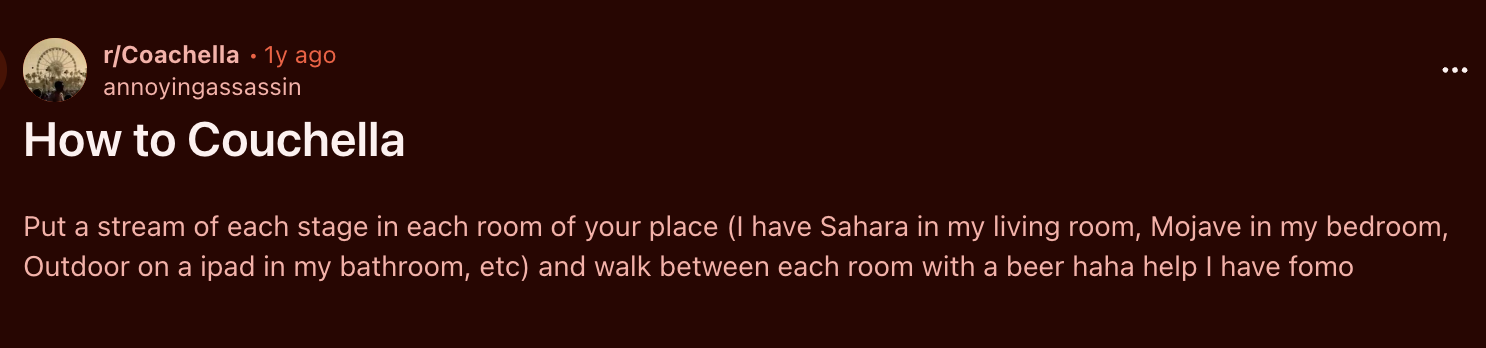
screenshot of a reddit post titled: How to Couchella

"Put a stream of each stage in each room of your place (I have Sahara in my living room, Mojave in my bedroom, Outdoor on a ipad in my bathroom, etc) and walk between each room with a beer haha help I have fomo"
this is fire ngl

been busy these past 2 weekends so haven’t caught as much this year, but the hip hop & r&b acts seemed even lower than usual this year. Which…yeah most rap acts aren’t built for festival stages after all. But made my Boo even less interested to have it on in the background haha.

I still wonder if I’d ever want to go……I mean, yea I do wanna go still (somehow). But who would I go with? I shoulda took Tasty Steve up on his offer that one time.

Frosty Faustings XVIII × Vortex Gallery 2026 Unofficial Event Guide for iOS/MacOS

What is this?

Y’all already know I ain’t gonna let FF slide on by without another one of my guides. If you already know the deal by now, you can skip to the end of the post for the download. For everyone new, read on to see what this handy little tool does.

This iOS/MacOS shortcut provides information regarding Frosty Faustings. Opening it will show a menu where you can get quick access to important & resources such pulling up the brackets, navigate you to the venue, displaying hotel & shuttle information, providing quick links to streams and more. Take a look at this video to see the one I made for CEO2025 in action.

Installation

  1. Make sure you have the Shortcuts app installed on your device. This is an official Apple application used to help automate your device.
  2. On your device, head to routinehub to download the shortcut (Tested on iPhone & Mac).
  3. Once it prompts you to install the shortcut, Click install.

How to Use It

Should be pretty self-explanatory. It’s basically a menu of options, just go through it & choose what info you’d like to see! For many of the actions, the shortcut will run again & pop up the main menu after you go through the steps. To dismiss it, just tap somewhere outside the menu & it will close.

The shortcut can also be run by tapping it’s icon inside the Shortcuts app. The best way to run it though is to make an icon for the shortcut on your homescreen! A quick how-to can be found here.

Hit Hagure (& Only Hagure) Up If It Broke!

⚠️Please note: This is an UNOFFICIAL release; If you encounter any issues, do NOT contact anyone from Frosty Faustings, as they will not be able to assist you. Instead, please let me know on FGC.Network or Bluesky & I will do my best to help.

NOTE: I am running Vortex Gallery in the Lilac Ballroom, so dask for Hagure at the VG TO Desk if you need some help!

Download the Shortcut Here on RoutineHub

If there are any updates, they will be posted on RoutineHub as well.

Enjoy!
Climax of Night Final Season: [breakadawn] Unofficial Event Guide for iOS/MacOS

What is this?

We back at it with another event guide. Same deal as my CB & CEO guides, but this time for the Final(!) Climax of Night (and the [b-sides])!

This iOS/MacOS shortcut provides information regarding Climax. Opening it will show a menu where you can get quick access to important resources such as the brackets, or navigation to the venue, hotel information, quick links to streams and more. Take a look at this video to see the one I made for CEO2025 in action.

Read on to learn more, or head to the bottom of the post for the download!

Installation

  1. Make sure you have the Shortcuts app installed on your device. This is an official Apple application used to help automate your device.
  2. On your device, head to routinehub to download the shortcut (Tested on iPhone & Mac).
  3. Once it prompts you to install the shortcut, Click install.

How to Use It

Should be pretty self-explanatory. Basically just go through it & choose what info you’d like to see! For many of the actions, the shortcut will run again after you go through the steps. To dismiss it, just tap somewhere outside menu & it will close.

The shortcut can be run by tapping it’s icon inside the Shortcuts app. The best way to run it though is to make an icon for the shortcut on your homescreen! A quick how-to can be found here.

Let Shinobi Chill!

⚠️Please note: This is an UNOFFICIAL release; If you encounter any issues, do NOT contact anyone from CoN, as they will not be able to assist you. Instead, please let me know on FGC.Network or Bluesky & I will do my best to help.

NOTE: I am running the [b-sides] room for CoN so hit me up in there or the arcade if you need some help!

Download the Shortcut Here on RoutineHub

If there are any updates, they will be posted here as well.

Enjoy!

Combo Breaker 2025 Unofficial Event Helper for iOS/MacOS

What is this?

This iOS/MacOS shortcut provides information regarding Combo Breaker 2025. Opening it will show a menu where you can get quick access to important resources such as the brackets, or navigation to the venue, hotel information, quick links to streams and more. Take a look at this video to see it in action.

Installation

  1. Make sure you have the Shortcuts app installed on your device. This is an official Apple application used to help automate your device.
  2. Open the link on your device (Tested on iPhone & Mac)1.
  3. Once it prompts you to install the shortcut, Click install.

How to Use It

Should be pretty self-explanatory. Basically just go through it & choose what info you’d like to see! For many of the actions, the shortcut will run again after you go through the steps. To dismiss it, just tap somewhere outside menu & it will close.

The shortcut can be run by tapping it’s icon inside the Shortcuts app. The best way to run it though is to make an icon for the shortcut on your homescreen! A quick how-to is below:

Don’t Bug Rick!

⚠️Please note: This is an UNOFFICIAL release; If you encounter any issues, do NOT contact anyone from CB, as they will not be able to assist you. Instead, please let me know on FGC.Network or Bluesky & I will do my best to help. NOTE: I am working the event (see me at the ten/o booth!), so I will not have much time for troubleshooting.

Download the Shortcut Here

  1. Please note that this is a large and complicated shortcut, it has many steps, and downloads all necessary images, so that it can still work when venue signal/wifi gets sketchy. It will take some time to load at first, so if you see things seemingly hanging, give it a few minutes & let the wheel spin for a bit, or refresh the page. Thanks Apple. ↩︎